The battle of the bots
I’ve spent a lot of time recently trying to protect my tools and resources from the relentless onslaught of AI scraper bots. I’ve documented much of the process here in case it’s of use to others (and to remind myself when I inevitably forget what I’ve done).
Over the years, I’ve often made use of cloud services such as Heroku and Google Cloudrun to share my odd assortment of tools and experiments. In particular, Cloudrun has offered an easy way of publishing interactive databases created using Datasette – one command and they’re online and open for exploration. This has worked (with a little fiddling) for databases of all sizes. The GLAM Name Index, for example, combines 10 databases totalling about 4 gigabytes of data. My only concern has been the amount of memory that Cloudrun demands to run Datasette databases. Throwing memory at things costs money, but because Cloudrun services can be configured to shut down when not in use, the overall hosting costs have remained manageable. Until now.
Earlier this year, I noticed that the Tung Wah Newspaper Index, that ran using Datasette on Heroku, was having trouble – it kept falling over because it exceeded Heroku’s CPU and memory limits. The cause was a dramatic increase in traffic from AI scraper bots. I’ve written my share of data scrapers over the years, but I’ve always tried to avoid placing any undue burden on systems. The AI scraper bots are different, they’re indiscriminate and unyielding – they want everything, they want it now, and they don’t care how much damage they do. In the case of the Tung Wah Newspaper Index, the problem was both the overall number of requests, and the number of requests for computationally-intensive queries, such as facets. The only good thing was that the Heroku instance had a fixed cost, so the influx was killing the resource, but not costing me extra.
I got the Tung Wah Newspaper Index running again by moving it to the Ubuntu server I run on Digital Ocean to host wraggelabs.com. I fiddled around with my nginx settings to add a block list of known bots, throttled the number of requests per second, and switched off facets in Datasette. I also analysed the nginx logs to identify the IP address ranges producing the most traffic and blocked them as well. I knew that this might affect legitimate users, but I just wanted to get it working again for most people.
Up until recently, the Datasette instances on Cloudrun didn’t seem to be attracting the same amount of traffic. But then I started getting alerts about unexpected billing increases. As I said above, Cloudrun instances can be configured to scale to zero when no requests are incoming – they switch themselves off when no one is using them. This conserves resources, and keeps costs down. But once the bots found my Datasette databases, the flood of requests was almost constant, so the services remained ‘on’ and my bills went up. All together, my Datasette instances used to cost me around $30 a month, this skyrocketed overnight and would’ve cost me several hundred per month if I left things as they were.
I was already using the datasette-block-robots plugin to generate a robots.txt file that told bots to go away. But the AI scraper bots just ignore these sorts of things. More drastic action was needed.
Sysadmin stuff makes me nervous, and I don’t like to fiddle with things that seem to be working. I was reluctant to move my databases from Cloudrun because it was so convenient, and because I was worried that other platforms would struggle with the amount of data I was sharing. As a result, I spent a number of days investigating Google’s own bot protection services – this seemed to involve putting a load balancer in front of my instances, then attaching their ‘Cloud Armor’ service to the load balancer. Of course, the more you paid, the more protection you got. I made a few attempts to get this going, but then gave up. The configuration itself was complex and confusing, but the main problem was that I felt I was just giving over more and more power to services that I didn’t really control or understand. The whole thing made me feel uneasy.
I did a bit of local testing and realised that actual memory requirements for my Datasette databases was much less than Cloudrun demanded. This meant I could conceivably get them all up and running on a smallish virtual server, such as I’m using for wraggelabs.com. But what about the bots? I decided to give Anubis a try. Some AI scraper bots identify themselves in the User-Agent header field of their HTTP requests – they tell you their names. This makes them relatively easy to block. But other bots masquerade as normal web browsers, so their requests seem to come from humans. Anubis sniffs out disguised bots by asking them to complete a challenge that’s only possible in a real web browser. It seemed like a much more complete and consistent approach than my ad hoc efforts to block IP ranges.
So the plan was:
- create a new domain for my databases
- create a new virtual server in a Digital Ocean droplet and attach the domain
- set up nginx and Anubis to manage web traffic and repel bot attacks
- migrate the databases, checking that they could comfortably fit within the server’s limits
- redirect the Cloudrun services to the new server
- monitor the bot traffic to make sure nothing was going to explode
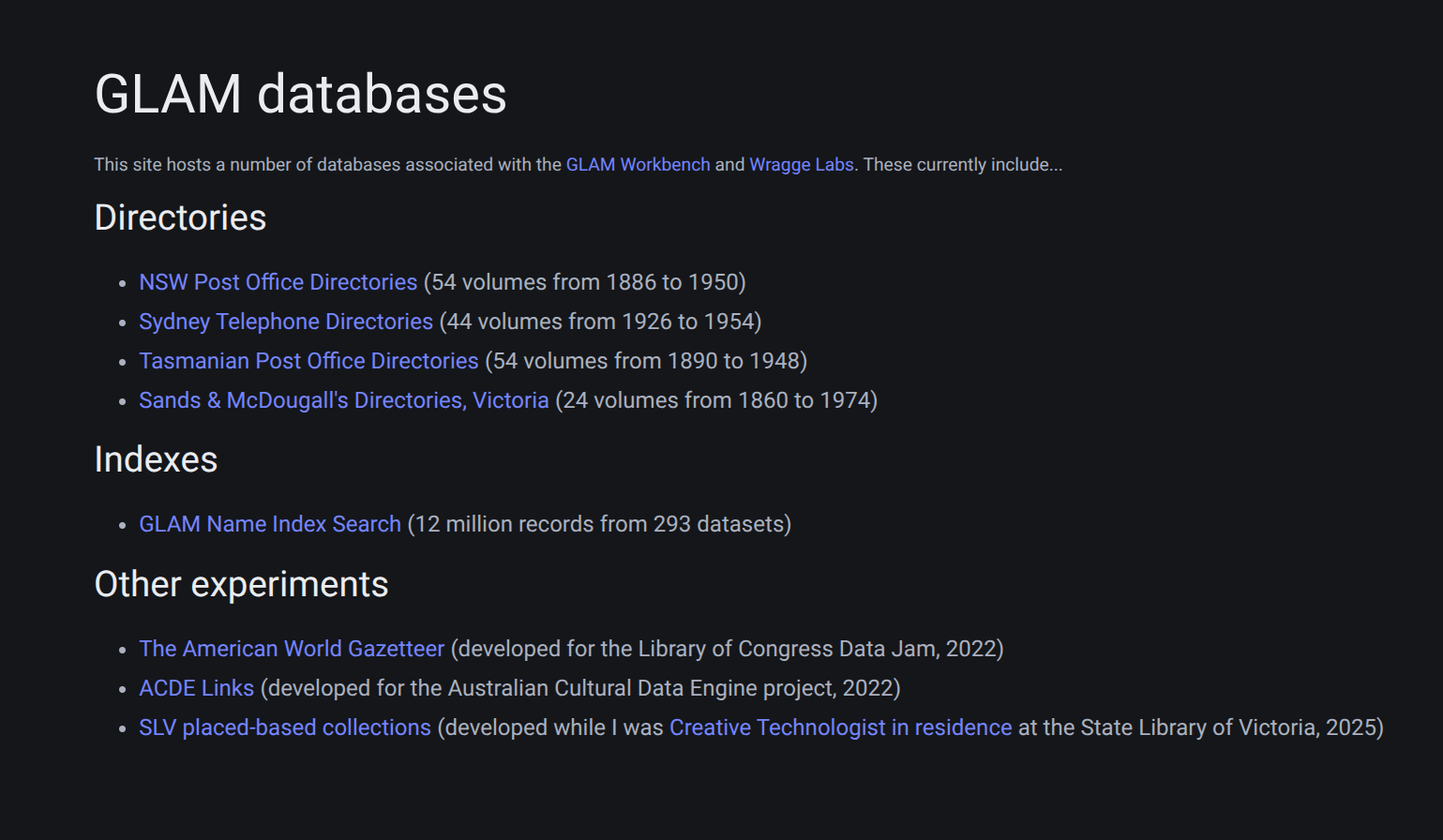
It’s all now done, the databases seem happy in their new home, Anubis is busy blocking bots, and my costs are contained. You can visit the databases at glam-databases.net. The gory details are below…
The technical details
I registered glam-databases.net and set up an Ubuntu server in a Sydney-located Digital Ocean droplet. I did the usual security stuff, like setting up a firewall and a non-root user, and then installed nginx and SSH using the Digital Ocean guides.
I installed Anubis using the instructions on the website. However, I wanted to use Unix sockets to connect everything up and ran into a few problems getting Anubis to write .sock files. This issue helped me understand that I needed to create a directory with the name of my Anubis service in /run/anubis. I eventually figured out that I also needed to add SOCKET_MODE=0777 to the Anubis config file to get the permissions right.
The other thing I struggled with a little was setting up logging. Once again it was mostly a permissions thing. The Anubis documentation explains that if you’re running Anubis via systemd you need to add a drop-in unit to allow Anubis to write to /var/log, however, I found that the drop-in needed to be saved to /etc/systemd/system/anubis@instance-name.service.d/ rather than /etc/systemd/anubis@instance-name.service.d/ as stated in the docs (notice the extra system directory).
Once the socket stuff was sorted, getting Anubis to talk to nginx was pretty straightforward, and I mostly just followed the Anubis documentation to make the necessary changes to the nginx config files. I’d set up a basic, static homepage for the site, so I tried accessing that to check that Anubis was in fact working. The Anubis challenge page was displayed as expected, and I could see the challenge details in the logs. Yay!
Next it was time to start moving my databases across. The first step was to ensure that each of my Datasette repositories included a requirements.in file, listing the necessary Python packages – this varied a bit across projects depending on the Datasette plugins they used, but the minimum was datasette and the datasette-block-robots plugin. To improve performance I used datasette inspect to calculate table row counts and write them to a json file in the repository. The counts file is loaded at run time using the --inspect-file parameter.
I created a directory for each of the databases on the new server, and used rsync to copy the database repositories across. Then in each of the database directories I created a virtual environment using pyenv, and installed all the necessary Python packages using pip-tools and the requirements.in file.
To get the databases running, I mostly just followed the Datasette documentation which provides information on running Datasette using systemd and configuring nginx. I used the --uds and --base_url settings to connect via unix sockets and deploy each database at a different url prefix. The only problem I found is that the base_url setting can be a little buggy – for example, links to json versions of pages sometimes included the base path prefix twice. Rather than fiddle about in the Datasette code, I decided to ‘fix’ this using rewrite directives in the nginx configuration file, for example: rewrite ^/gni/gni/(.+)$ /gni/$1 break; I’m sure there are better solutions, but I figured this would do the job until things got fixed upstream.
Here’s an example of the systemctl service files I created for each database (with the key redacted):
[Unit]
Description=Sand and MacDougall's Directories (Victoria) Datasette
After=network.target

[Service]
User=tim
Group=www-data
Environment=DATASETTE_SECRET=**********************************
WorkingDirectory=/home/tim/databases/victoria-sands-mac-dirs
ExecStart=/home/tim/.pyenv/versions/victoria-sands-mac-dirs/bin/datasette serve -i sands-mcdougalls-directories-victoria.db --uds /tmp/victoria-sands-mac-dirs.sock   --inspect-file=counts.json --template-dir templates --static static:static  -m metadata.json --setting base_url /vic-smd/  --setting facet_time_limit_ms 10000 --setting suggest_facets off --setting allow_csv_stream off
Restart=on-failure

[Install]
WantedBy=multi-user.target
The parameters used when starting Datasette vary a bit depending on the project (for example some don’t have custom templates) but in general they are:
-irun in immutable mode for better performance--udspath to unix socket--inspect-filepath to precalculated row counts--template-dircustom template directory--staticdirectory and url prefix for static files-mpath to metadata file--setting base_urlurl prefix pointing to this database--setting facet_time_limit_msmaximum time allowed for facet requests--setting suggest_facets offdon’t provide example facets (both for performance and to avoid providing new paths for bots to find)--setting allow_csv_stream offfor performance
I created a service file like this for every database and saved it to the /etc/systemd/system/ directory.
For each database I created two new sections in the nginx config file. First in the main server block I added a location entry that directed requests to the database’s url prefix. For example:
location /vic-smd {
        rewrite ^/vic-smd/vic-smd/sands-mcdougalls-directories-victoria/(.+)$ /vic-smd/sands-mcdougalls-directories-victoria/$1 break;
        proxy_pass http://victoria-sands-mac-dirs/vic-smd;
        proxy_set_header Host $host;
}
Then I created an upstream entry for each service that send these requests to the database socket.
upstream victoria-sands-mac-dirs {
	server unix:/tmp/victoria-sands-mac-dirs.sock;
}
Of course, after all the changes I ran sudo systemctl start or restart and checked that things were ok using sudo systemctl status.
Once I had migrated all the databases, I left things alone for a day to make sure they were comfortably settled into their new home and that the server didn’t explode. I monitored the system stats, and found that the memory consumption was much lower than it had been on Cloudrun. So all seemed good.
Then it was time to redirect the Cloudrun urls to the new database locations. When I created the Cloudrun instances, there was no option to add custom domains to instances in Australia. In most cases, I created redirects from the GLAM Workbench that I encouraged people to use and share, but I noticed that people were often saving the ugly Cloudrun urls instead. This meant that I couldn’t just switch the domain config, I had to replace the Cloudrun instances themselves with redirects. This ended up being much easier than I expected. Using docker-web-direct I could spin up little nginx proxies to replace the Cloudrun databases. For example to redirect the Tasmanian Post Office Directories, I used the Cloudrun CLI to send the following command:
gcloud run deploy tasmanian-post-office-directories --image morbz/docker-web-redirect --allow-unauthenticated --set-env-vars "REDIRECT_TARGET=https://glam-databases.net/tas-pod"
The key things are the service name, in this case tasmanian-post-office-directories, and the new url https://glam-databases.net/tas-pod.
I repeated this for each of the databases on Cloudrun. Of course, redirecting the urls to help people find the new locations also opened the door to the scraper bots, and they quickly muscled their way through. I was monitoring both the Anubis log file and the system stats as I redirected each database – the traffic went up, but everything was pretty stable, and Anubis seemed to be working.
Checking the nginx log I noticed that one bot, meta-webindexer, was hitting one of the databases hard and wasn’t being blocked by Anubis. There’s an open issue in the Anubis GitHub repo to add this bot to the blocklist, but it was easy to modify the default bot policy file to repel it:
  - name: meta-webindexer
    user_agent_regex: meta-webindexer
    action: DENY
Datasette has a built-in JSON API and I use this to pull data into things like my SLV apps. For this to continue working I had to open a pathway in the Anubis bot policy file:
  - name: allow-api-requests
    action: ALLOW
    expression:
      all:
        - '"Accept" in headers'
        - 'headers["Accept"].contains("application/json")'
        - 'path.contains(".json")
This means that requests with .json in the url and application/json in the accept headers will not be challenged by Anubis. I then modified some of the apps to make sure they actually were sending the correct headers, and it worked!
Next steps
Things have gone pretty smoothly so far, but I’ll be keeping my on the stats. Now that I understand how Anubis works, I also want to install it on Wragge Labs and remove the ad hoc blocks I put in place earlier.
I’ll leave the redirects running on Cloudrun for a while, but not forever. If you use any of these databases, please update your bookmarks and links!
- NSW Post Office Directories (54 volumes from 1886 to 1950)
- Sydney Telephone Directories (44 volumes from 1926 to 1954)
- Tasmanian Post Office Directories (54 volumes from 1890 to 1948)
- Sands & McDougall’s Directories, Victoria (24 volumes from 1860 to 1974)
- GLAM Name Index Search (12 million records from 293 datasets)
I’m relieved to have brought my Cloudrun costs under control, but all of this still costs money. Over recent years, I’ve been lucky to have the support of my GitHub sponsors to help me pay my cloud hosting bills. I’m planning on moving away from GitHub eventually and I’ve set up a brand new profile on LiberaPay. They’re an open source, community managed organisation that doesn’t take a cut of your donations, so if you want to help me keep things online you can set up a sponsorship there.